Help Main History Threshold-rpg
Threshold Time help
Threshold Time is very simple to use therefore I haven't done
a regular help system
but an HTML web help. Once again, I hope you enjoy Threshold Time.

Starting Threshold Time
Okay, I really have no clue why am I doing this but anyway, you run the program like that:
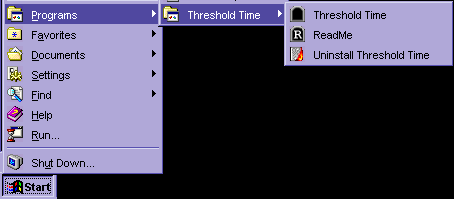
So it is very simple, after you install the program you go to
Start Menu and from there
to Programs --> Threshold Time --> Threshold Time.
Here you did it ;). Congratulations.
Main screen
Now after you got it, you see the following window:
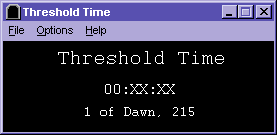
This is the main window of Threshold Time, you can't change
or edit nothing here,
the only thing you can do is watch the time (The "00:XX:XX") in
the middle and the
date ("1 of Dawn, 215") in the bottom. Also, to shut the Bank Alert
off just click
everywhere in this window.
P.S - You CAN see the time when the program is minimized, try and see.
Menus
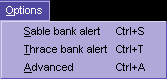
These are the menus of Threshold Time:


File --> Reset --> A fast way to set the clock if you
mess it up.
It
puts the time on 1/1/115 00:00:00
File --> Exit --> Quits the program (Saves automatically all your time
settings
before
it does so).
Options --> Sable bank alert --> Turns the Sablean bank
alert on/off, when it's on
the
clock will ring at 09:00, and unless you
stop
it from ringing (by clicking everywhere on the
main
window) it will ring until the bank closes.
Be
aware however that you will hear the ring when the
bank
opens anyway (But the icon won't blink). When the
bank
alert is on, Threshold Clock's icon will be replaced
with
a dollar, on the alert itself it will blink.
Options --> Sable bank alert --> Turns the Thracian bank alert on/off,
when it's on
the
clock will ring on 11:00 o'clock and unless you
stop
it from ringing (by clicking everywhere in the
main
window) it will ring until the bank closes.
Be
aware however that you will hear the ring when the
bank
opens anyway (But the icon won't blink). When the
bank
alert is on Threshold Clock's icon will be replaced
with
a dollar, on the alert itself it will blink.
Options --> Advanced --> Takes you to the advanced options
screen where you can change the
main things in Threshold Time i.e.: Set the time, chose how to run
the program and set the sound for the bank alerts.
Further, you can see more detailed information.
Help --> About --> About Threshold Time, version and copyrights.
Help --> Calendar --> The months in Threshold.
Advanced options Screen
Now you see this:
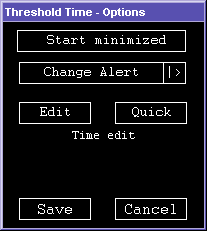
When you click on "Start minimized" you toggle on/off
the option to start the program
in task bar, i.e. if you toggle it on, next time you run it, it will start
in the task bar
like this:

"Change alert" button lets you to
choose a WAV file to be played when there is a bank
alert, if you have anything better than the default sound, send it to me.
Go wild ;).
Next are the two time edit modes, whether you
set up the time at first or
something got wrong with the time correctness (Never happened to me though)
you will use
these buttons. There are two ways to set the time:
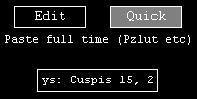
Quick mode - Use this mode to enter an exact time for an exact source in Threshold
(For
example
timepiece is a good source). All you need to do is to click on the
Quick
button and paste the time like that:
Edit mode - This mode is especially for fixing
small defects in time. Since Threshold Time
saves
the time in a file and doesn't require the time info to be input every
time
there could be little defects. I have checked the program for a week (Quiting
and
restarting every time). There was no deffect or it was too small to see.
Surely
I can say that if you use the program properly there is less then a second
defect
in week.
However,
if you need to do a little change use this option

Left
click will increase the chosen time, right click will decrease it. You can
hold the
mouse down to move it quicker.
Also,
the time won't be updated until you press the Save button, so you're free
to
play with it and press Cancel.
Faq
Q: What is Threshold???
A: Threshold
is a great role-playing MUD with a big community.
Q: It says I am missing some DLL or OCX file. What to do?
A: Download the full version of Threshold Time, after that if the smaller
file is newer,
download it. Sorry for the inconvenience.
Q: The time isn't correct, I have to fix it every time!
A: It is VERY weird. I checked the recover of time function many times and
I found it working
perfectly. Mail me what the problem is and I'll try to help,
however, it should not happen.
Try to check your time and if you have any auto-correction
programs that fix the time using
the internet, disable them.
Q: I found a bug!
I have a cool idea!
A: Please mail me to [email protected],
I promise to answer quickly every letter.
Q: I liked it, yet, have you thought about moving the time view
from the task bar to the tray?
A: I did, but I don't know how to do it elegantly so far, if you can help
with it (VBasic)
you're more than welcome.
Q: Why did you replace the minutes and the seconds with X's?
A: The first versions included minutes and seconds, however, minutes and seconds
make the
Timepiece in Threshold useless, therefore I excluded them.
Q: Can I get those first versions?
A: No.
Q: Why did you put the black color everywhere and used buttons
of DOS?
A: Because.
Q: I think your program sucks, it ruins the fun of typing "time"
in Threshold and role-playing
it. Also I think that it violates some unknown but really
important rules, what do you have
to say about it?
A: You don't love it - you don't use it.
Threshold Time really helped me to enter the role-play environment.
Also, Michael (aka Aristotle) checked Threshold Time and
found it legal to use, it doesn't
ruin the fun for no one.
Q: I can do one better, your program looks like a hobby of a
newbie to computers.
A: Fine, make a better one.
Q: Your program totally screwed my computer, what to do?!
A: Pray ya dolt!
Q: Do you enjoy writing questions to yourself and answering
them?
A: Yep, do you enjoy reading them?
Threshold Time and all files associated
with it are Copyright © Vitaly Belman.
This page is Copyright © Vitaly Belman.